Monitorowanie planów faktur zaliczkowych
Aplikacja Plan faktur zaliczkowych (CIP) jest używana do monitorowanie planów faktur zaliczkowych. Aby otworzyć aplikację Plan faktury zaliczkowej (CIP), znajdź pozycję Finanse w menu RamBase, a następnie pozycję Należności. Kliknij Plany faktur zaliczkowych, aby wejść do aplikacji CIP.
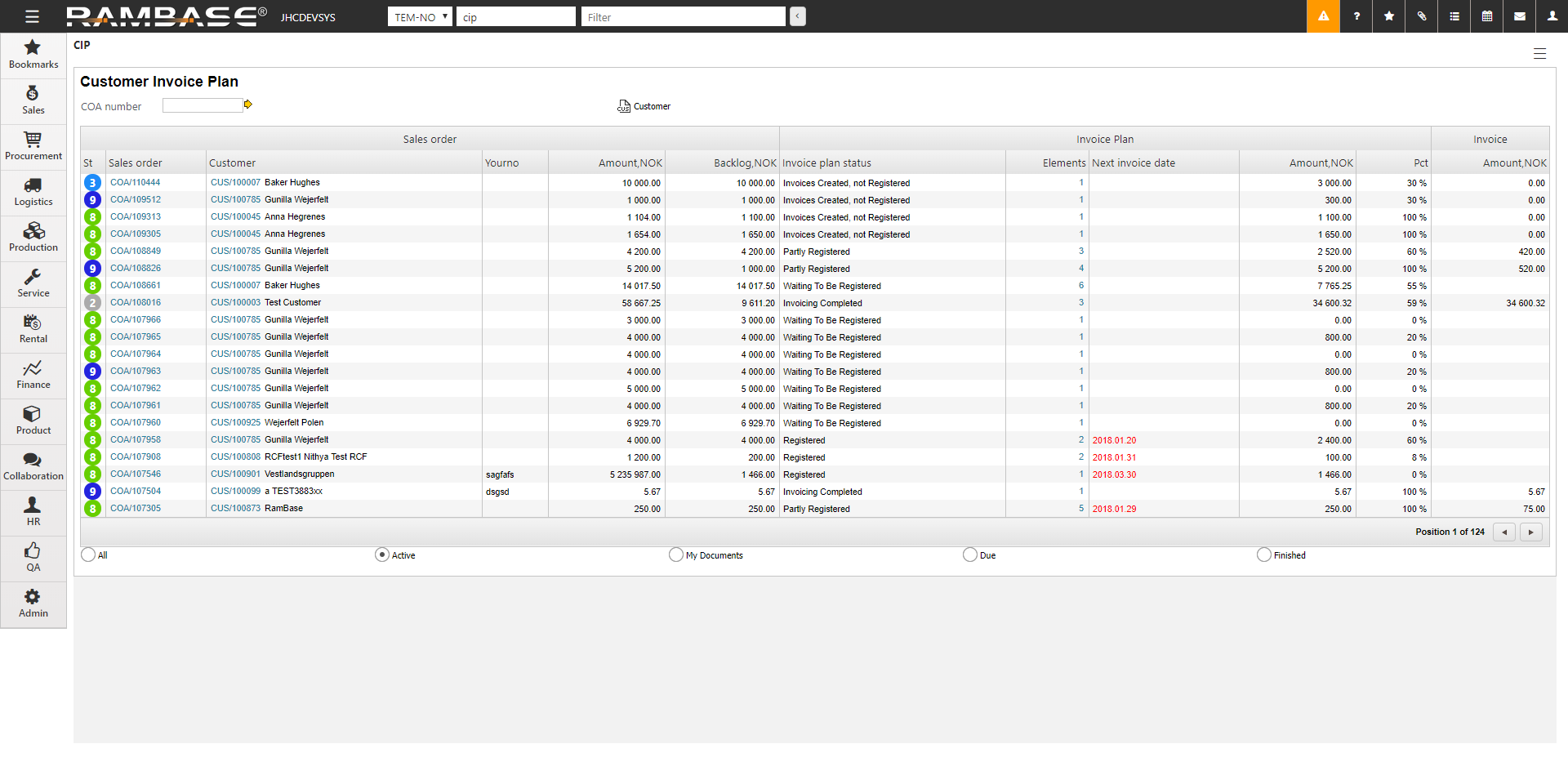
Dokumenty COA można filtrować za pomocą pola numeru COA, klikając ikonę nabywca (CUS) lub za pomocą przycisków opcji.
Wprowadzanie Planu faktur zaliczkowych (CIP) dla określonego zamówienia sprzedaży (COA)
Aby otworzyć aplikację Plan faktury zaliczkowej (CIP), znajdź pozycję Finanse w menu RamBase, a następnie pozycję Należności. Kliknij Plany faktur zaliczkowych, aby wejść do aplikacji CIP.
Aby zawęzić wyniki wyszukiwania, użyj pola numeru COA, filtruj według nabywcy lub użyj przycisków opcji.
Wyróżnij wybrany dokument COA i naciśnij klawisz ENTER.
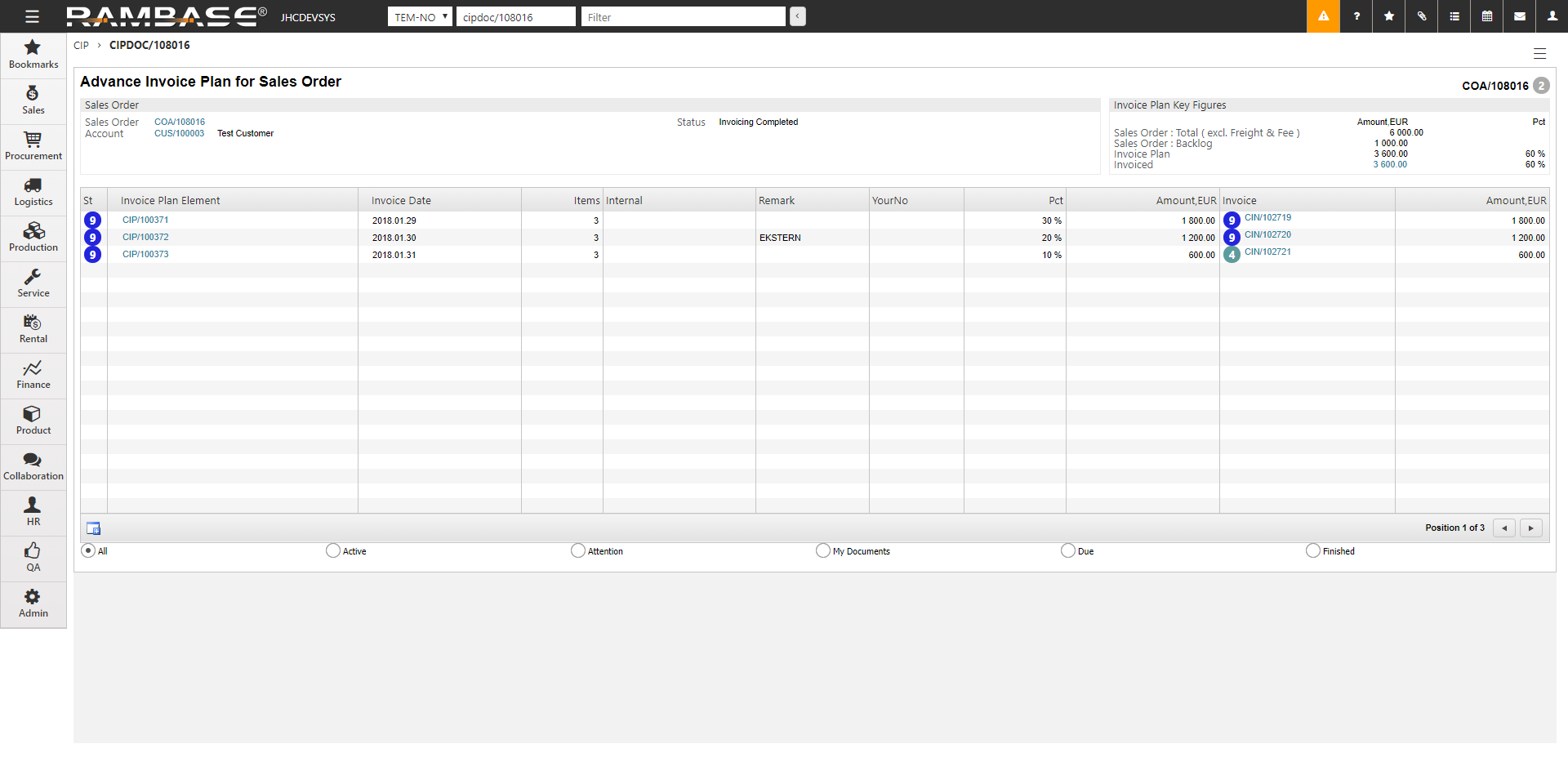
Obszar Kluczowe dane liczbowe planu faktury
Zamówienie sprzedaży: Suma (bez frachtu i opłaty) – całkowita kwota zamówienia sprzedaży (COA) bez frachtu i innych opłat.
Zamówienie sprzedaży: Zaległości – kwota niedostarczonego COA.
Plan faktury – kwota i procent COA zaplanowane w planie faktury zaliczkowej (CIP).
Zafakturowane – zafakturowana kwota i procent COA.
Edycja dokumentu CIP
Dokument CIP można edytować do momentu zarejestrowania faktury sprzedaży (CIN) (CIN w statusie 4 lub wyższym) z tego dokumentu.
[en] You can edit an advance invoice plan whenever the linked sales order changes, for example if:
[en] The sales order value increases or decreases
[en] Milestone percentages need to be adjusted
[en] Milestone values need to be redistributed
[en] Advanced invoice plans items (CIPITEMS) are added, removed, or changed
[en] Milestone dates or scheduling need to be updated
[en] Plans can be modified at any stage until the final invoice has been completed.
Jeśli CIN została utworzona (status 1) dla dokumentu CIP, możesz ją odrzucić, aby edytować dokument.
[en] Each significant change to an advance invoice plan is stored as a new version. Previous versions remain available for audit purposes, allowing users to review the original plan together with the invoices issued from that version.
Dokument CIP ze statusem 4 jest gotowy do rozliczenia.
[en] Updated milestone values
[en] Any credit notes that will be created
[en] Any difference invoices that will be created
[en] The effect on the final invoice
[en] This allows users to verify the changes before they are applied.
[en] Create a consolidated invoice from multiple Advanced invoice plan items
[en] Users can select multiple eligible Advance Invoice Plan items (CIPITEMS) and include them in a single Sales Invoice (CIN).
[en] This allows users to consolidate milestone invoicing across several Sales Order items while maintaining the individual relationship between each CIP item and its original Sales Order item (COAITEM).
[en] Select the CIP items you want to invoice and create the consolidated invoice. The selected items are validated to ensure that they have compatible invoicing conditions.
[en] When the invoice is created, each selected CIP item is individually linked to the resulting Sales Invoice and marked as invoiced.
Uwaga
[en] Only compatible CIP items can be included in the same invoice. A CIP item can only be invoiced once.